Managing AI spend without the shock invoice
AI agents have been transformational — when they’re set up with the right context, tooling and infrastructure. But working closely with organisations deploying AI at scale, we keep seeing the same pattern: the productivity gains get quietly eaten by token spend nobody was watching — tokenmaxxing, in the extreme.
Here’s how to keep the upside of AI-driven workflows without a shock invoice at the end of the month.
1. Model selection
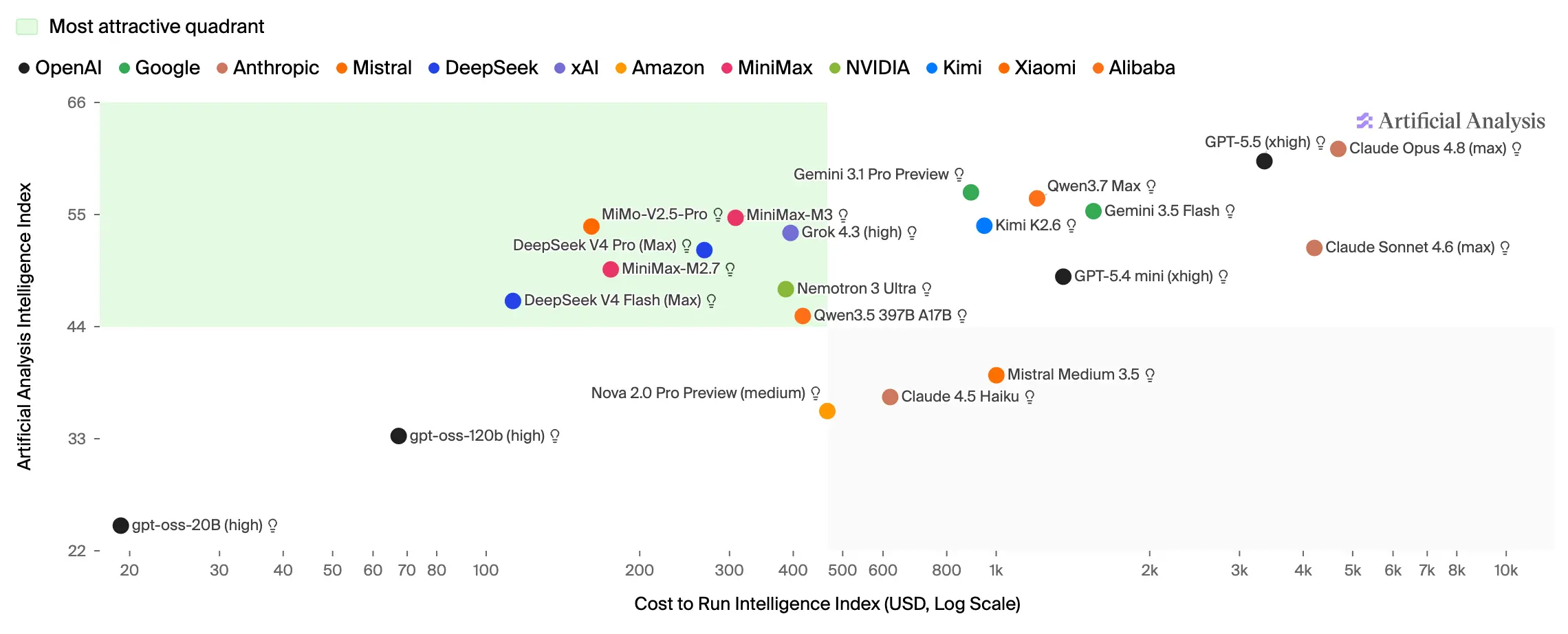
The default instinct is to reach for the best model available. But pricing between tiers can differ by 5x or more for the same outcome — asking a top-tier model like Claude Fable 5 to write an email or review a five-page PDF is overkill.
Model routing
Model routing is one of the most powerful levers for token spend: a router directs each request to a different model based on the complexity of the task. It only applies to requests made via API — if your team uses Claude or ChatGPT directly, the user picks the model, which we come to below.
Two main approaches:
-
Company gateway — every AI request flows through a gateway that applies routing logic to pick the most cost-effective model for the job. You can build this in-house or use a service like OpenRouter’s Auto Router. Routing at the company level lets you enforce policy globally, though a single policy rarely suits everything — specialised work like coding usually needs smarter models than general workflows do.
-
App-level routing — each AI application layers in its own routing model that analyses the task and selects the model for that workflow. Easier to set up and tune, but the number of routing setups grows with every new internal app.
Routing has become far more reliable in recent months, so the old tax — tasks sent to a weaker model and then reworked — has largely faded.
Employee policies
Routing doesn’t cover everything — direct tools like Claude Cowork still leave the choice to the user. There, the fastest savings come from policy: set a sensible default such as Sonnet 4.5, and reserve the most expensive models — GPT 5.5, Fable 5 — for the groups that genuinely need them, like the software development team. (The habits that reinforce this are in Employee training, below.)
2. Observability and reporting
You can’t optimise what you can’t see. A reporting pipeline across every AI workflow is essential — both to avoid surprise bills and to find where spend is leaking. Track, at minimum:
- spend per employee, grouped by model
- spend per workflow or app
- spend per cost centre
- flags for expensive models running routine tasks
- unit economics for customer-facing apps
Beyond control, this gives the finance team the data to forecast properly.
3. Batch inference
Plenty of agentic work doesn’t need to happen at request time — processing a collection of invoices, say. Routing those jobs through the batch API lets the provider schedule them in off-peak windows, typically for around 50% less.
4. Employee training
Beyond model selection, there’s plenty of low-hanging fruit in how people actually use AI — sometimes as small as not thanking the model once it’s done. A few habits that compound:
- Start a new session for each task — carrying an old conversation forward wastes input tokens and can drag down accuracy on the new job.
- Give full context in the first message — drip-feeding details forces the agent to reprocess everything on each turn, often over clarifying questions you could have pre-empted.
- Keep scheduled tasks current — a daily job running an outdated model or stale tooling quietly multiplies cost; review them regularly to hold efficiency.
None of this is exotic. Spend discipline is simply part of operating AI-native — the same instinct that ships a use case and then makes it repeatable applies to the bill that comes with it. Put the observability in early, make the cheap defaults the path of least resistance, and the productivity gains stay gains.
Most companies bolt AI on. The best are built around it.
Book a working session →